
Android setup
Open the site in Chrome, tap the menu icon, then choose add to home screen.
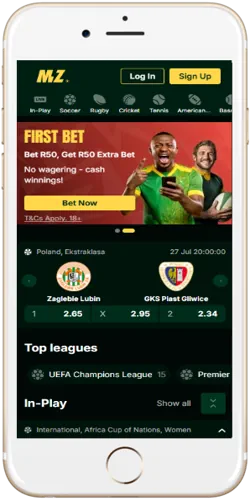
Mzansibet's mobile experience runs through a responsive site rather than a separate application file, which means there is no APK size to manage on a phone with limited storage. This differs from operators that push a standalone Android package outside the Play Store, a method that usually asks a player to change security settings before installing, since Android blocks unknown sources by default.
Skipping a dedicated APK also means updates apply automatically the next time the site loads, with no manual reinstall step required. A player switching between an Android phone and an iPad reaches the identical account and balance without downloading two separate builds, which also avoids the storage warnings that heavier native betting apps sometimes trigger on older devices.
Browser-based access carries one trade-off worth noting: without an app icon from the Play Store, a player has to bookmark the login page or use the add-to-home-screen shortcut covered in the next section to get an app-like icon. Once that shortcut exists, the day-to-day experience of opening Mzansibet looks the same as opening any installed app, just without the separate download step.
Adding Mzansibet to a home screen takes a few taps once the mobile browser is open on the login page, and the result behaves like a normal app icon without a Play Store listing. The steps differ slightly between Android and iOS, since each operating system handles home-screen shortcuts through its own browser menu rather than a shared install prompt.
Chrome on Android and Safari on iOS both support this shortcut method, though a player using a different mobile browser such as Firefox or Samsung Internet may find the option under a slightly different menu label. Once added, the shortcut opens directly into the Mzansibet interface without loading a separate browser address bar, which shortens the time between tapping the icon and placing a bet on a live PSL match. This approach also means there is nothing to uninstall if a player switches phones, since the account itself lives on Mzansibet's servers rather than inside a local app file.
Open the site in Chrome, tap the menu icon, then choose add to home screen.
Open the site in Safari, tap the share icon, then choose add to home screen.
Saved login details carry over between the shortcut and a regular browser tab.
Pages load progressively, which keeps data use lower than a media-heavy native app.
A mobile browser session and a desktop session on Mzansibet share the same account, balance and bet history, so switching devices mid-match does not reset an open bet slip. Desktop access shows more markets per screen at once, while the mobile layout stacks the same markets into a single scrollable column, which suits quick in-play checks better than building a large multi-leg accumulator.
Live in-play odds refresh at the same rate on both, so a PSL match followed on a phone during a commute updates identically to the desktop view at home. A player building a five-leg accumulator across football, rugby and cricket markets may still prefer a desktop screen simply because more selections fit into view without repeated scrolling, even though both devices process the bet the same way once submitted.
Bettors travelling between provinces for PSL away fixtures or SA20 matches often rely on this shortcut method precisely because it works identically on any phone borrowed from a friend or picked up as a backup, with no app store account or password needed beyond the usual Mzansibet login. The comparison below is not about which access method is better overall, since both connect to the same account, but about which screen size and input method suits a given moment, whether that is a quick single bet between meetings or a longer session building out a full accumulator slip.
Mobile browser access
Desktop browser access
Mobile access works on recent versions of Chrome, Safari and Firefox, and a browser more than a few years out of date may not render every casino game correctly, particularly live dealer tables that rely on video streaming. A stable connection matters more than device age for crash games like Aviator, since a dropped connection mid-round can cut off a cash-out attempt before the multiplier is banked.
Session limits carried over from the account settings apply the same way on mobile as on desktop, ranging from 6 minutes up to 1,000,000 minutes, and hitting that limit logs the session out automatically regardless of device. Cooling-off periods, available from 1 day up to 1 year, disable deposits and withdrawals on every device tied to the account until the period ends, and self-exclusion periods of 6 months, 9 months or 1 year work the same way across both mobile and desktop logins.
Because Mzansibet does not distribute a separate APK, there is no second app permissions list to review the way there would be with a standalone Android install; browser permissions such as notifications or location remain the only settings a player needs to check on a new device. Local mobile networks such as Vodacom, MTN, Telkom and Cell C all support this browser-based approach without requiring a special data bundle, since the site itself is built to load efficiently on standard 4G speeds common across Gauteng, the Western Cape and KwaZulu-Natal.